
Beginner’s Guide: SOC170 - Passwd Found in Requested URL - Possible LFI#
What Happened?#
On March 1, 2022, at 10:10 AM, our security system detected a suspicious web request that looked like someone was trying to break into one of our servers.
The Alert Details#
Basic Information:
- Event ID: 120
- When: March 1, 2022, 10:10 AM
- Alert Type: SOC170 - Passwd Found in Requested URL - Possible LFI Attack
- Severity Level: Security Analyst (requires investigation)
The Computers Involved:
- Target Server: WebServer1006 (IP: 172.16.17.13)
- Attacker’s Computer: Unknown computer with IP 106.55.45.162
What They Tried to Do:
- Method: GET request (asking the server for information)
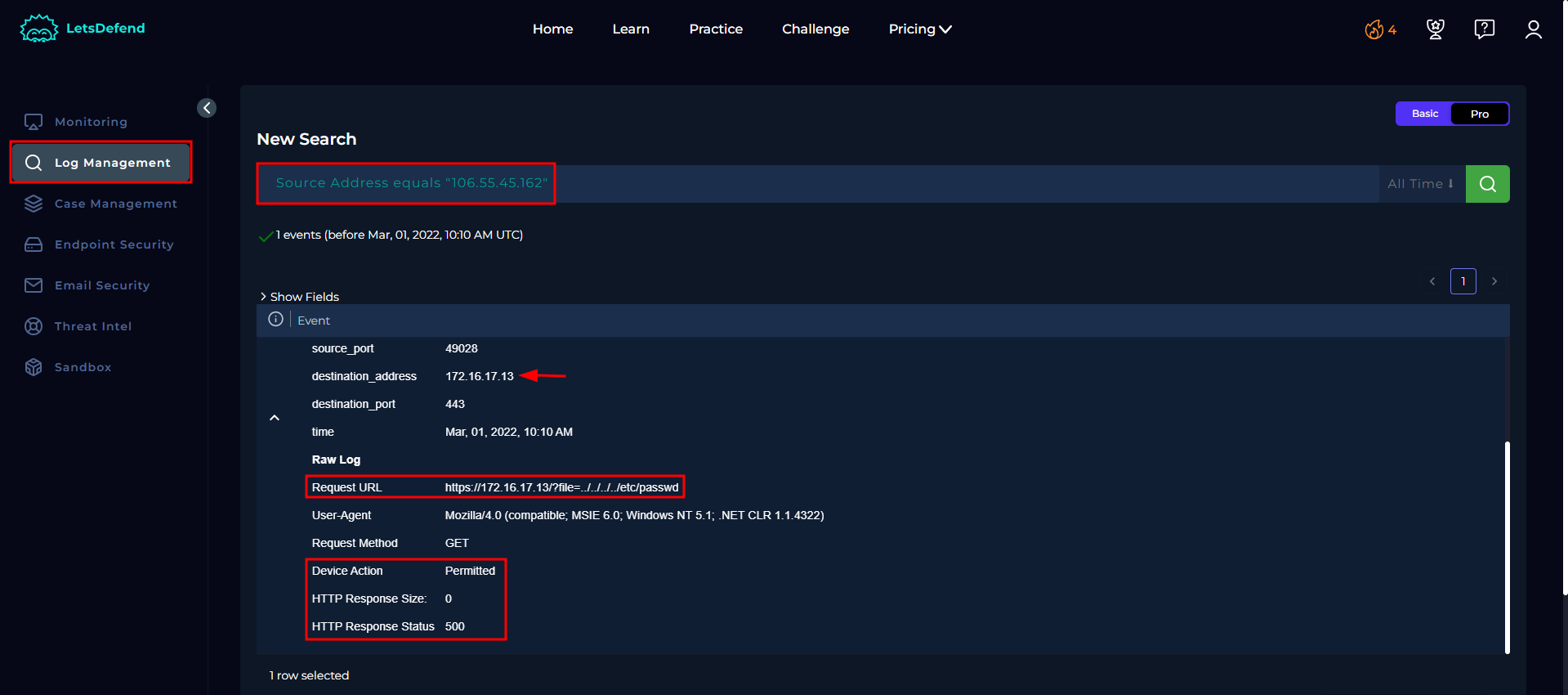
- Suspicious URL:
https://172.16.17.13/?file=../../../../etc/passwd - Browser Used: Very old Internet Explorer (suspicious!)
This can be confirmed from the Log management area:
Understanding the Attack#
What is LFI (Local File Inclusion)?#
LFI stands for “Local File Inclusion.” Think of it like this:
- Imagine your web server is like a library
- Normally, visitors can only ask for books from the public section
- An LFI attack tries to trick the librarian into giving them books from the restricted vault
Breaking Down the Malicious URL#
Let’s examine this suspicious web address: https://172.16.17.13/?file=../../../../etc/passwd
Normal web request might look like:
https://172.16.17.13/?file=homepage.html
This malicious request:
../../../../- These dots and slashes mean “go up four folder levels”etc/passwd- This is trying to access a sensitive system file that contains user information
Think of it like: Instead of asking for “Room 101,” the attacker asked for “go upstairs, upstairs, upstairs, upstairs, then get me the master key list”
The Source of the Attack#
IP Address Investigation#
Target Server (172.16.17.13):
- Name: WebServer1006
- Operating System: Windows Server 2019
- Main User: webadmin11
- Last Normal Login: February 19, 2022, 1:01 PM
This can be confirmed from the Endpoint security: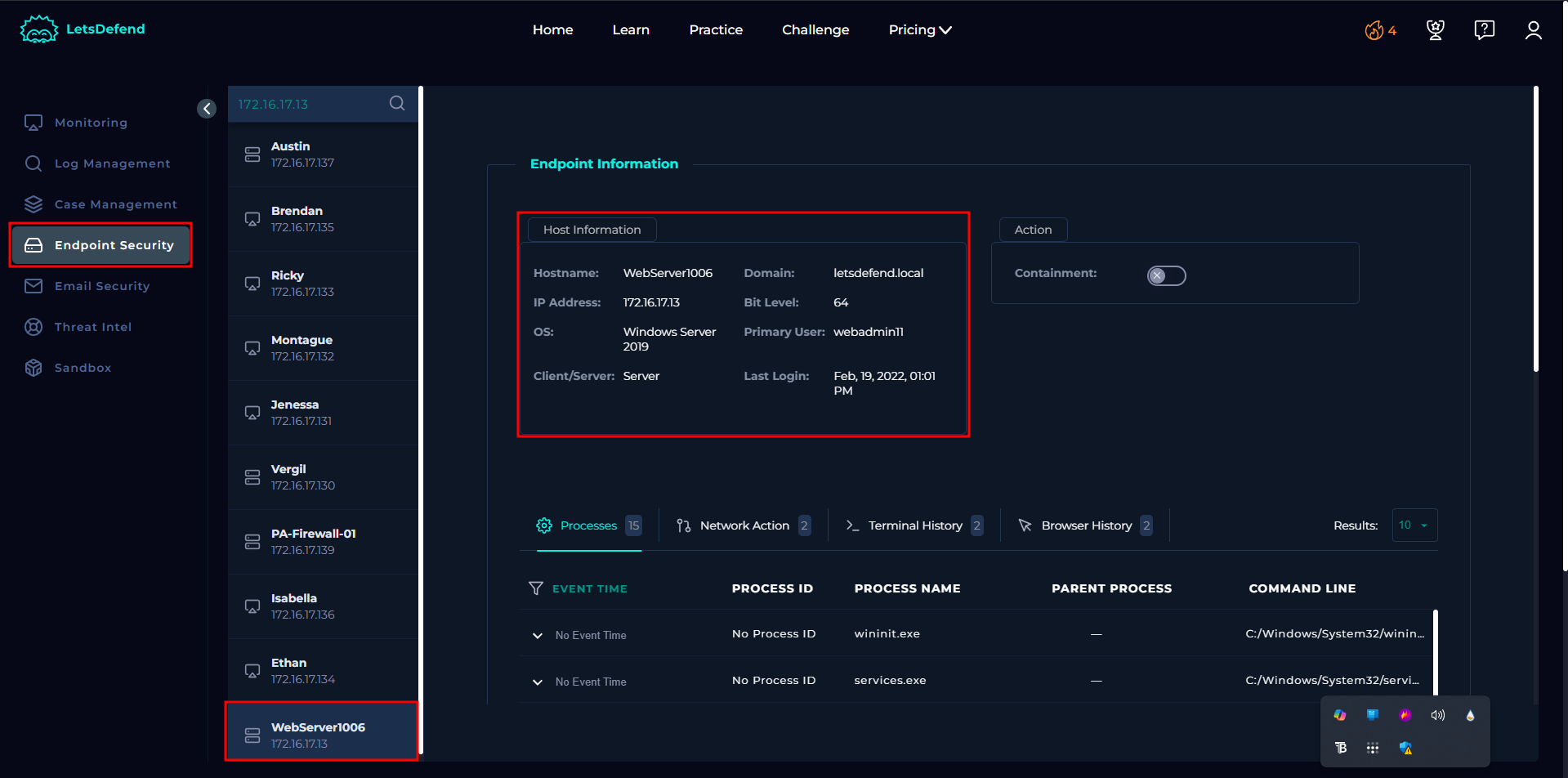
Attacker’s IP (106.55.45.162):
- Location: External (from the internet, not our network)
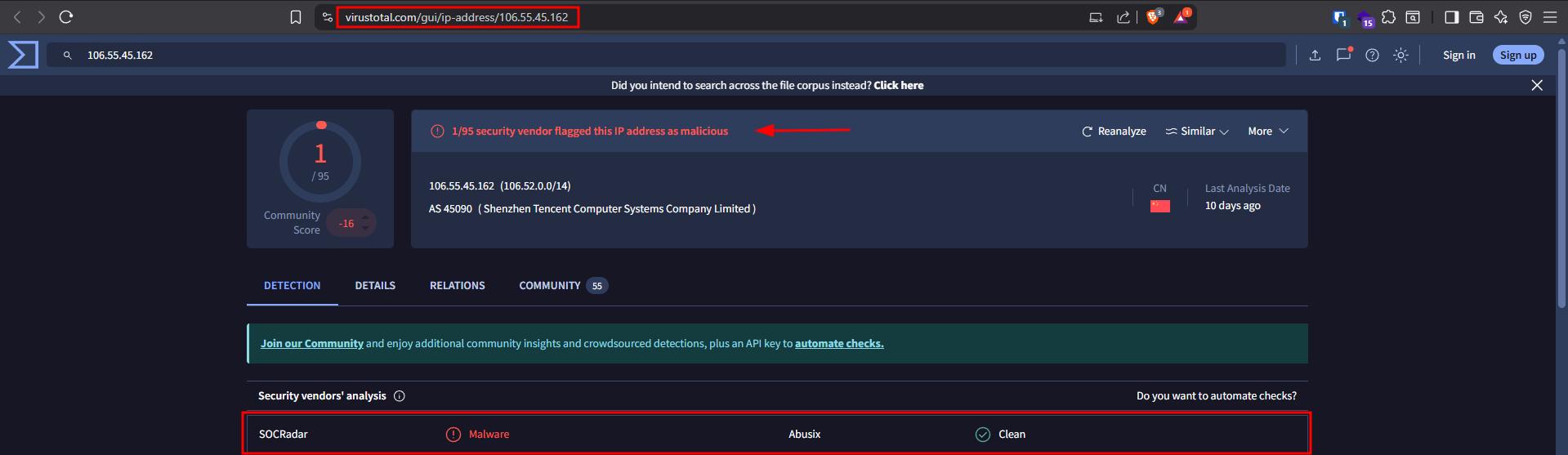
- Status: MALICIOUS
- Confirmed by VirusTotal (a service that checks if IP addresses are known to be bad)
This can be confirmed from virustotal website:
Why This IP is Suspicious#
- It’s not from our company network
- VirusTotal database shows this IP has been used for attacks before
- Using a very old browser (Internet Explorer 6) - legitimate users rarely use such outdated software
Technical Analysis#
What Our Security System Detected#
- Alert Trigger: The word “passwd” in the URL
- Device Response: Allowed (the server tried to process the request)
- Result: Failed (Response Status: 500 = Server Error)
- Data Retrieved: 0 bytes (nothing was stolen)
Why the Attack Failed#
The server returned a “500 Internal Server Error” with no data, which means:
- The server couldn’t process the malicious request
- No sensitive files were accessed or stolen
- Our web application’s security worked as intended
Additional Verification Steps#
We checked our email security system to see if this was a planned security test:
- No authorized penetration testing was scheduled
- No legitimate security scans were planned for this server
- This confirms the request was genuinely malicious
Impact Assessment#
What Could Have Happened (If Successful)#
If this attack had worked, the attacker might have:
- Accessed user account information
- Found system passwords
- Discovered sensitive configuration files
- Used this information for further attacks
What Actually Happened#
Good news: The attack completely failed
- No data was stolen
- No files were accessed
- Server security held up
Final Decision#
Why We’re Not Escalating This Incident#
- Attack was unsuccessful - No damage occurred
- Server responded correctly - Security measures worked
- No ongoing threat - Single failed attempt
- Source is known malicious - Fits pattern of automated scanning
What We’re Doing About It#
- Logging the incident for future reference
- Monitoring for similar attempts from this IP
- Documenting the attack pattern for security awareness
Key Takeaways for Beginners#
What This Teaches Us#
- Attackers constantly scan for vulnerabilities - This was likely an automated attack trying many servers
- Security layers work - Even though the request was “allowed,” the application security prevented data access
- Monitoring is crucial - We caught this attempt and can learn from it
- Not all alerts require escalation - Failed attacks with no impact can be logged and monitored
Red Flags to Remember#
- URLs with
../patterns (directory traversal attempts) - Requests for system files like
passwd,shadow,hosts - Very old browser user agents
- External IPs making unusual requests
- Response codes like 500 that might indicate attempted exploitation
Prevention Tips#
- Keep web applications updated
- Implement proper input validation
- Use Web Application Firewalls (WAF)
- Regular security testing
- Monitor and alert on suspicious patterns