
HTB Ignition - Beginner Penetration Testing Walkthrough#
What is This?#
This is a step-by-step guide for solving the “Ignition” challenge from Hack The Box (HTB). This walkthrough is designed for beginners who are new to penetration testing and cybersecurity.
Prerequisites#
- Basic knowledge of Linux command line
- Understanding of what IP addresses and ports are
- Familiarity with web browsers
Phase 1: Enumeration (Information Gathering)#
What is Enumeration?#
Enumeration is the process of gathering information about a target system. Think of it like reconnaissance - we’re trying to learn as much as possible about what services are running and how we might gain access.
Step 1: Network Scanning with NMAP#
What is NMAP? NMAP (Network Mapper) is a tool that scans networks to discover what services are running on different ports. Think of ports like doors on a building - each one might lead to a different service.
The Command:
sudo nmap -sCV -p- -T4 10.129.1.27
Breaking Down the Command:
sudo- Run with administrator privilegesnmap- The network scanning tool-sCV- Combines two options:-sC- Run default scripts to gather more information-sV- Detect service versions
-p-- Scan ALL ports (1-65535) instead of just common ones-T4- Set timing to “aggressive” (faster scanning)10.129.1.27- The target IP address
The Results:
Starting Nmap 7.95 ( https://nmap.org ) at 2025-08-30 09:58 EAT
Nmap scan report for 10.129.1.27
Host is up (0.27s latency).
Not shown: 65534 closed tcp ports (reset)
PORT   STATE SERVICE VERSION
80/tcp open  http    nginx 1.14.2
|_http-server-header: nginx/1.14.2
|_http-title: Did not follow redirect to http://ignition.htb/
Service detection performed. Please report any incorrect results at https://nmap.org/submit/ .
Nmap done: 1 IP address (1 host up) scanned in 982.30 seconds
Step 2: Understanding the Results#
What We Found:
- Only 1 open port: Port 80 (HTTP web service)
- Web server: nginx version 1.14.2
- Important discovery: The website redirects to
http://ignition.htb/
What is a Domain Name?
ignition.htb is a domain name. However, our computer doesn’t know where this domain points to, so we need to tell it.
Step 3: Adding the Domain to Our Hosts File#
What is the /etc/hosts file? This file tells your computer which IP address to use when you type in a domain name. It’s like a local phone book for your computer.
The Command:
echo "10.129.1.27 ignition.htb" | sudo tee -a /etc/hosts
Breaking Down the Command:
echo "10.129.1.27 ignition.htb"- Create the text we want to add|- Pipe (send) that text to the next commandsudo tee -a /etc/hosts- Append the text to the /etc/hosts file with admin privileges
Result: Now when we visit http://ignition.htb in our browser, it will go to IP address 10.129.1.27.
Phase 2: Web Enumeration#
Step 4: Exploring the Website#
When we visit http://ignition.htb, we find a basic website but nothing immediately useful for gaining access.
Step 5: Directory Brute-forcing#
What is Directory Brute-forcing? This is the process of trying many different URL paths to find hidden pages or directories on a website. It’s like trying different door handles to see which ones are unlocked.
The Tool: FFUF FFUF (Fuzz Faster U Fool) is a web fuzzing tool that tries many different URLs quickly.
The Command:
ffuf -u http://ignition.htb/FUZZ -w /usr/share/seclists/Discovery/Web-Content/directory-list-2.3-small.txt -ac -ic
Breaking Down the Command:
ffuf- The fuzzing tool-u http://ignition.htb/FUZZ- The URL pattern (FUZZ gets replaced with words from our wordlist)-w /usr/share/seclists/Discovery/Web-Content/directory-list-2.3-small.txt- The wordlist file containing common directory names-ac- Auto-calibrate to filter out false positives-ic- Ignore comments in wordlist
The Results:
adminuODLwsSK           [Status: 200, Size: 25806, Words: 5441, Lines: 426, Duration: 610ms]
contact                 [Status: 200, Size: 28673, Words: 6592, Lines: 504, Duration: 1205ms]
home                    [Status: 200, Size: 25802, Words: 5441, Lines: 426, Duration: 2321ms]
media                   [Status: 301, Size: 185, Words: 6, Lines: 8, Duration: 232ms]
0                       [Status: 200, Size: 25803, Words: 5441, Lines: 426, Duration: 2441ms]
static                  [Status: 301, Size: 185, Words: 6, Lines: 8, Duration: 283ms]
catalog                 [Status: 302, Size: 0, Words: 1, Lines: 1, Duration: 6498ms]
Home                    [Status: 301, Size: 0, Words: 1, Lines: 1, Duration: 5820ms]
admin                   [Status: 200, Size: 7095, Words: 1551, Lines: 149, Duration: 6566ms]
cms                     [Status: 200, Size: 25817, Words: 5441, Lines: 426, Duration: 5820ms]
Understanding HTTP Status Codes:
- 200 - OK (page exists and loads successfully)
- 301 - Permanent redirect
- 302 - Temporary redirect
Key Discovery: We found an /admin page!
Phase 3: Exploitation#
Step 6: Investigating the Admin Panel#
When we visit http://ignition.htb/admin, we discover:
- A login page for Magento (an e-commerce platform)
- We need username and password credentials
What is Magento? Magento is a popular e-commerce platform used to build online stores. Admin panels are where administrators manage the website.
Step 7: Credential Guessing#
The Strategy: Since we don’t have specific credentials, we can try common default passwords. Many systems are left with weak, default credentials.
Common Weak Passwords: Based on research into commonly used passwords, we can try combinations like:
- admin:admin
- admin:password
- admin:123456
- admin:qwerty123
Some of these are listed here: https://cybernews.com/best-password-managers/most-common-passwords/
Step 8: Successful Login#
The Breakthrough:
After trying common password combinations, the credentials admin:qwerty123 successfully logged us into the Magento admin panel.
Why This Worked:
- Many administrators use weak, predictable passwords
- “qwerty123” combines the QWERTY keyboard pattern with simple numbers
- Default usernames like “admin” are commonly left unchanged
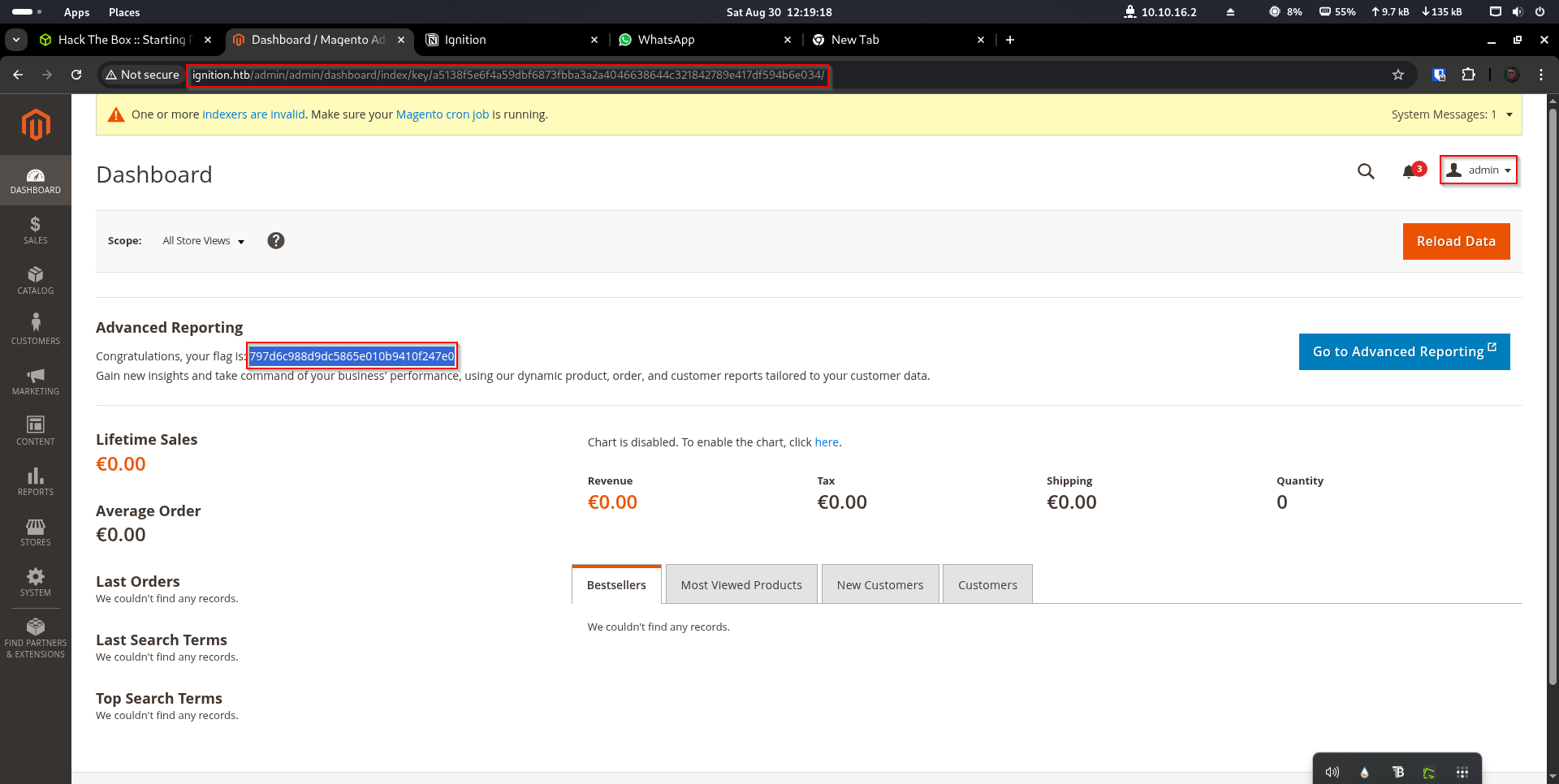
Step 9: Finding the Flag#
Once logged into the Magento admin panel, we can explore the dashboard and find the flag for this challenge.
Key Learning Points#
Security Lessons Learned#
Default Credentials are Dangerous
- Always change default usernames and passwords
- Use strong, unique passwords for admin accounts
Information Disclosure
- The NMAP scan revealed the web server version
- Directory enumeration exposed the admin panel
- Both pieces of information helped us focus our attack
The Importance of Enumeration
- Thorough reconnaissance often reveals the path to success
- Multiple tools (NMAP, FFUF) provide different types of information
Tools We Used#
- NMAP - Network and port scanning
- FFUF - Web directory/file fuzzing
- Web Browser - Manual exploration and login attempts
Ethical Considerations#
Important Note: This type of testing should only be performed on:
- Systems you own
- Systems you have explicit permission to test
- Dedicated practice environments (like Hack The Box)
Unauthorized access to computer systems is illegal in most jurisdictions.
Summary#
This challenge demonstrated a common real-world scenario where:
- Poor password practices (weak admin credentials)
- Information leakage (exposed admin panels)
- Insufficient access controls
Combined to create a security vulnerability that allowed unauthorized access to the system.
The key takeaway is that security is only as strong as the weakest link - in this case, a predictable password on an exposed admin interface.